
レストランのパスタメニューを作成したいと思います。GPTsとともに進めていきます。
初めは、Filmでお試し生成。
Film
luxury Italian restaurant menu design (1.3),
A4 vertical layout (1.2),
white marble background (1.3),
elegant serif typography (1.2),
gold accent details (1.1),
warm lighting (1.2),
high-end atmosphere (1.3),
chef message text block at top (1.2),
four pasta photos arranged in 2×2 grid (1.3),
each photo with text directly below (1.3),
clean layout (1.2),
refined composition (1.2),
realistic food photography (1.2),
soft shadows (1.1),
high resolution (1.2)
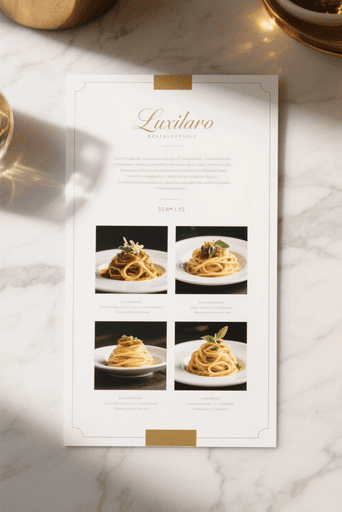
テーブルなどの背景を無しくメニューだけの画像にしたいです。
luxury Italian restaurant menu (1.2),
full screen menu layout (1.2),
white marble texture background (1.2),
no restaurant interior (1.2),
no table setting (1.2),
vertical A4 composition (1.1),
elegant serif typography (1.2),
gold thin divider lines (1.0),
center aligned layout (1.2),
chef message text block at top (1.1),
four pasta sections vertically arranged (1.2),
each section photo then text below (1.2),
warm tone (1.1),
high-end design (1.2),
clean spacing (1.1),
realistic pasta photography (1.1),
high resolution (1.2)

まだ背景が残っていますが、このプロンプトを変えずにNano Bananaで生成してみます。
SeaArt版Nano Banana Pro Image
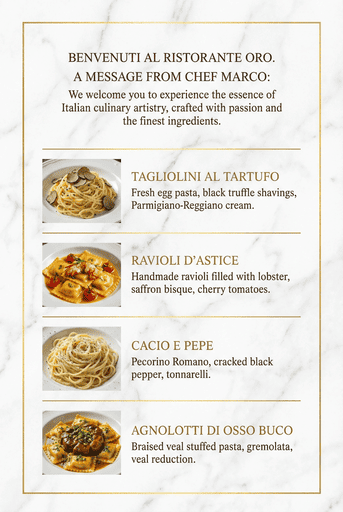
できました。やはりプロンプトの問題ではありませんでした。GPTsは、Stable Diffusion向けのプロンプトを生成します。SeaArtのベースはStable Diffusionです。ところがプロンプトを正しく認識して生成できたのはNano Banana Pro Imageでした。
backgroundの解釈
Filmは、メニューの後ろにある背景という解釈でしたが、Nano Banana Pro Imageは、初めに宣言したメニューそのものの背景という解釈でした。とても重要な部分かと思います。
参考生成
Gemini3+Nano Banana Pro Image
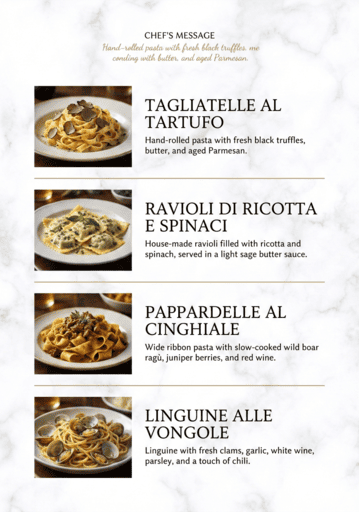
ChatGPT+画像生成
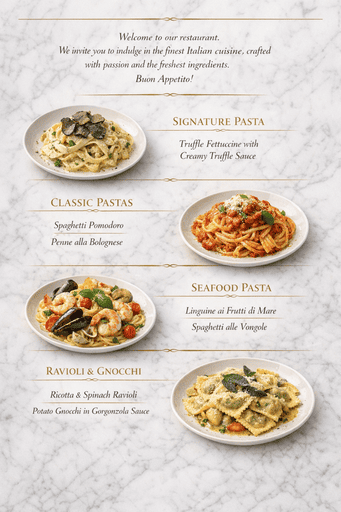
「日本語」「価格」などにこだわらずメニューを作成してみました。それらにこだわりすぎると沼にはまってしまいます。そのため、ベースができてから編集する方が効率的だと思います。0から始めて100を作れるようになるには、あと少しの画像生成AIの進化が必要だと思います。
今回は、1つのプロンプトでメニュー作成を試みました。パスタ画像と別アプリで作成した日本語テキスト画像を組み合わせる方法を使えば、現在の力のNano Banana Pro ImageあるいはChatGPTで素敵なメニューを作れるかもしれません。

コメント